Website and ERP
A school website and the full ERP, in the school's own colours and logo.
Ask for a quoteAdmissions, fees, accounts, attendance, exams, payroll and a parent app in one place. Built for schools in Andhra Pradesh and across India by someone with 15 years in school ERP.
Built and used in a live school, Raghavan EM High School, and available to other schools as their own separate app. Ask for a free trial login after the demo.
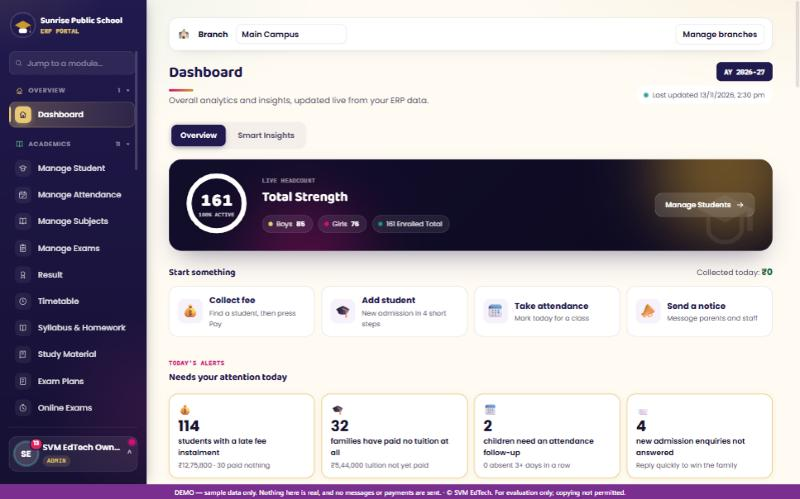
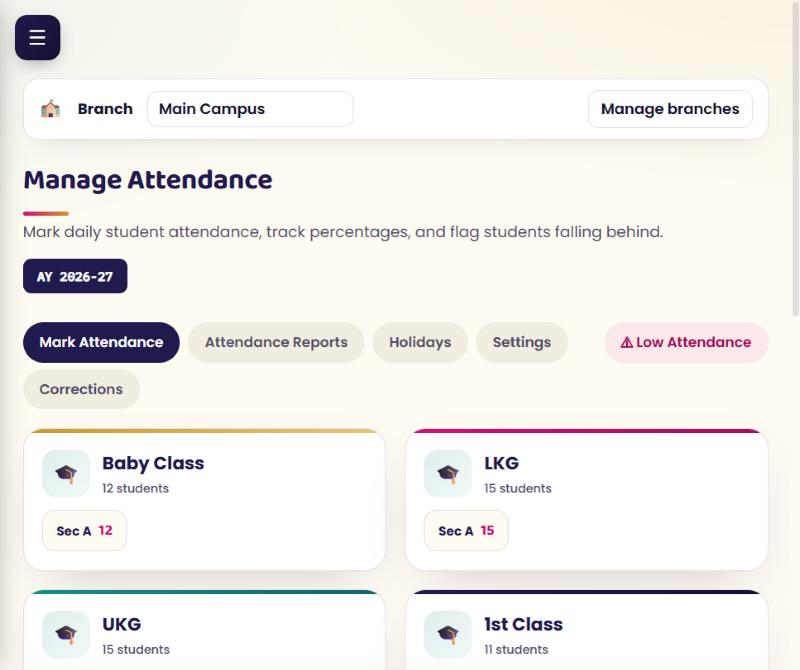
Screens from our live demo school. All data shown is sample data.
Book a demo and we will walk you through it live.
Students, attendance for pupils and staff, exams and results, admissions and the timetable, without spreadsheets.
Fee receipts, balances, concessions and refunds, with UPI payments that parents report and the office verifies.
Payment vouchers, cost centres and payroll with EPF and ESI. An accounts section many school ERPs leave out.
Parents see attendance, fees, notices and results on their phone, with one login for all their children.
Take all of it, or only the modules you need.
Enquiry to enrolment, student records, class lists and bulk import from Excel.
Pupils and staff, with reports, holidays and low-attendance follow-up. Biometric device sync is optional.
Collection, concessions, refunds and balances, with numbered receipts and year-wise history.
Payment vouchers, cost centres and an overview of the school's total position.
EPF and ESI, leave and loss of pay, payslips and leave statements, with optional posting to Accounting.
Subjects, exams, marks entry, grading scales and report cards. Marks stay hidden from parents until released.
Hall ticket numbers, room allotment per session and printable hall tickets, with an optional hold while fees are due.
Class timetables, subject allotments and a simple daily view for each teacher.
Routes and bus passes, books, hostel rooms and stock with sales to students.
Notices targeted to classes, parents and staff, with a notification centre.
Dashboards and ready reports for fees, attendance, results and staff, plus certificates and ID cards.
Admin, Principal, teachers, office staff and parents each see only their own part. Installs like an app on a phone.
Most school ERPs feel half finished and slow to change. This is how SVM EdTech is different.
Parents, teachers and the office open the school's own address and install it like an app. Each person sees only their own part of the school.
Admin, Principal, teachers, office staff and parents each see only what they should.
Once entered, they stay put. Corrections go through approval by the Admin or Principal.
Optional extra protection for the Admin and Principal accounts.
Every school has its own app and database, never shared with another school.
Automatic backups, and a full data backup you can download whenever you like.
Important actions such as refunds, deletions and fee exceptions are recorded with who did them.
Subjects, exams, grading scales and report cards set the way your school already works.
Your own exam structure, grading scale and report card templates, not a fixed format.
Simple admissions, attendance and fee receipts, with a parent view that is easy to use.
Fees, accounts and payroll with EPF and ESI in one place, so management sees the full picture.
Runs on an ordinary smartphone and installs like an app. Pay only for the modules you use.
One ERP for every branch. Branch staff see their own branch, and management sees all of them.
We show a live demo around your school's questions, then give your team a time-limited trial login to test every view.
Website and ERP, ERP only, or the modules you pick.
Your own app and database, in your school's colours and logo.
Staff, parents and the office start using it, with a direct line to us for changes.
The price depends on the size of your school and the modules you choose. We quote after the demo.
A school website and the full ERP, in the school's own colours and logo.
Ask for a quoteThe complete ERP for schools that already have a website.
Ask for a quoteStart with students, attendance, fees and exams, and add more later.
Ask for a quoteEvery package is quoted for your school after the demo.
SVM EdTech is run by Venu Madhav Sankavaram, Founder. For 15 years he has worked with school ERP systems, and kept meeting the same problems: products that feel half finished, changes that take months or never arrive, and no real accounts section for the management.
So he built one that covers the whole school, from admissions to accounts, and stays open to the changes each school asks for. SVM EdTech is based in Andhra Pradesh and works with schools across the state and the rest of India.
Yes. After the demo we can create a time-limited trial login for your school, with a login for each role (Admin, Staff and Parents), so your team can test every view.
Any. Grading scales, exam structure and report card layouts are set by your school, so State Board, CBSE and ICSE schools can all use it.
Yes. Student records can be imported from an Excel template, and we help you check them before your school goes live.
Yes. Every school gets its own app and its own database, and a full data backup can be downloaded at any time.
No. Choose ERP only. The website package is for schools that also want a new website in their own colours and logo.
Yes. Admin, staff and parents each get their own login and see only their own part. It installs like an app on a phone.
Yes. Fee receipts, balances, payment vouchers and cost centres sit in the same system, along with payroll including EPF and ESI.
There is a one-time setup fee and a yearly fee. Setup and the first year are paid at signing, then the yearly fee each year. You get the full quote after the demo, and GST is extra.
It depends on your school's size and which package or modules you choose. Message us and we will send a quote after the demo.
Send us your school's name and a convenient time, and we will get back to you.